
Cybercriminals are getting smarter—and one of their latest tactics is malvertising, a method that uses malicious ads to distribute compromised software. If you’re a network engineer, system administrator, or anyone who relies on tools like PuTTY, WinSCP, or FileZilla, this is a threat you need to understand and defend against.
What Is Malvertising?
Malvertising is short for malicious advertising. Attackers purchase ad space on legitimate platforms or infiltrate ad networks to push poisoned links. These ads often appear at the top of search results, making them look trustworthy. When users click these ads, they’re redirected to fake websites hosting Trojanized installers—software that looks legitimate but contains malware.
Why is this so effective?
- Trust in search engines: Many users assume top results are safe.
- Professional urgency: Admins often need tools quickly and may skip verification steps.
- Sophisticated mimicry: Fake sites and installers often look identical to official ones.
Why Admin Tools Are Prime Targets
Attackers know that IT professionals and network engineers have high-level access to critical systems. Compromising their tools can lead to:
- Credential theft for privileged accounts
- Lateral movement across enterprise networks
- Deployment of ransomware or remote access trojans (RATs)
A single infected installer can become the entry point for a major breach.
Recent Campaigns and Incidents
The past two years have seen a surge in malvertising attacks targeting admin tools:
- 2024: Fake PuTTY and WinSCP installers delivered via search results. Malware used DLL sideloading to deploy ransomware and RATs.
- 2025: Oyster backdoor campaign. Fake installers created scheduled tasks and loaded malicious DLLs (e.g., twain_96.dll). Some were signed with revoked certificates, making detection harder.
- August 2025: Updated Oyster variant served from compromised legitimate websites. Leveraged cloud-based command-and-control (C2) and junk code for evasion. This is the major threat circulating now.
Software Commonly Targeted
Attackers focus on widely used tools across multiple categories:
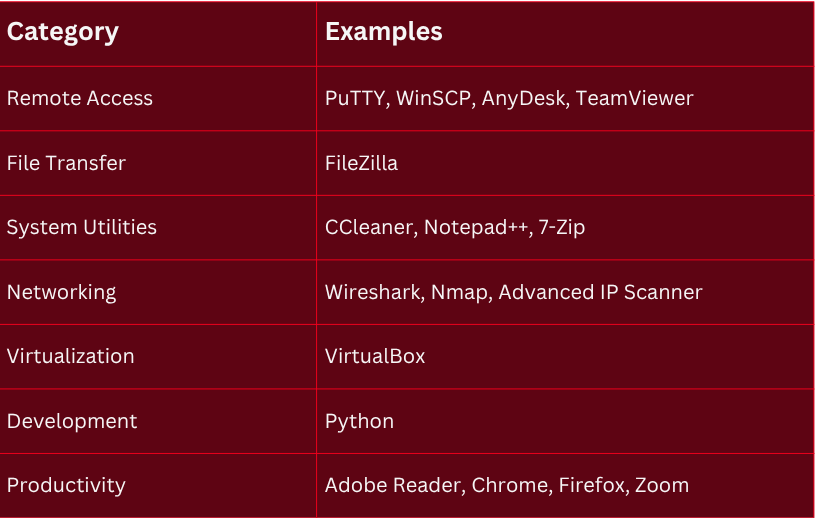
How Malvertising Works
Here’s the typical attack flow:
- Ad Placement: Attackers buy ads for keywords like “download PuTTY.”
- Poisoned Links: Ads redirect to fake sites mimicking official vendors.
- Trojanized Installers: Downloaded EXEs contain backdoors or ransomware loaders.
- Persistence: Malware creates scheduled tasks, injects DLLs, and connects to C2 servers.
Why This Matters
- Privilege escalation risk: Admin tools often run with elevated permissions.
- Supply chain compromise: Fake installers can spread across enterprise environments.
- Detection challenges: Signed binaries and junk code evade traditional antivirus solutions.
Defensive Actions
To protect yourself and your organization:
- Download only from official vendor sites or trusted internal repositories.
- Avoid search engine ads—verify URLs before clicking.
- Check digital signatures: Right-click → Properties → Digital Signatures tab.
- Use hash validation: Compare SHA256 hashes with vendor-provided values.
- Escalate to SOC: If unsure, send the link for verification.
Key Takeaways
Malvertising is not a fringe threat—it’s a mainstream attack vector targeting the tools we rely on every day. A few extra seconds spent verifying downloads can prevent credential theft, ransomware outbreaks, and network compromise.


.webp)


.svg)

